
View your digital member ID card in the UnitedHealthcare app

Use your mobile device to scan the QR code and download the app.
What is a digital member ID card?
You may get a digital ID card as well as a physical card. Use your mobile device to download the UnitedHealthcare app to easily view your digital member ID card, anytime.
When will I need my member ID card?
Keep your member ID card handy when you:
- Go to the doctor
- Go to the hospital
- Have lab work done
- Get a prescription filled (if your plan has drug coverage)
Health care providers use the information from your member ID card to confirm they are part of your plan’s network and to bill your health plan for your care.
Looking for information on UCard for Medicare Advantage members?
How do I use my digital ID card?
- Sign in to your member account
- Select View ID Card
If you have more than one UnitedHealthcare plan — such as medical and dental — you may see more than one card on the UHC app or in your member account.
- Sign in to the UHC app
- Select Member Cards
You can also add your digital ID card to your smartphone’s digital wallet for a secure way to store and access details about your plan. Once you’re in the app, select Member Cards and Add to Wallet.
- Sign in to the UHC app
- Select Member Cards
You can also add your digital ID card to your smartphone’s digital wallet for a secure way to store and access details about your plan. Once you’re in the app, select Member Cards and Add to Wallet.
- Sign in to your member account
- Select View ID Card
If you have more than one UnitedHealthcare plan — such as medical and dental — you may see more than one card on the UHC app or in your member account.
Note: If you only have vision coverage (not paired with a UnitedHealthcare medical plan), access your digital ID card on myuhcvision.com.
Examples of information found on member ID cards
Here are some examples of information found on UnitedHealthcare member ID cards. Most member ID cards have the member ID number and group number on the front of the card. To find your member ID or group number on your digital ID card, open the UHC app and select Member Cards. Your member ID and group number will be on the image of your ID card and under Plan information.
Your member ID card may vary depending on your specific health plan and coverage. It may include:
- Member
- Dependents
- Member ID number
- Group number
- Primary care provider (PCP), if your plan requires you to choose a PCP
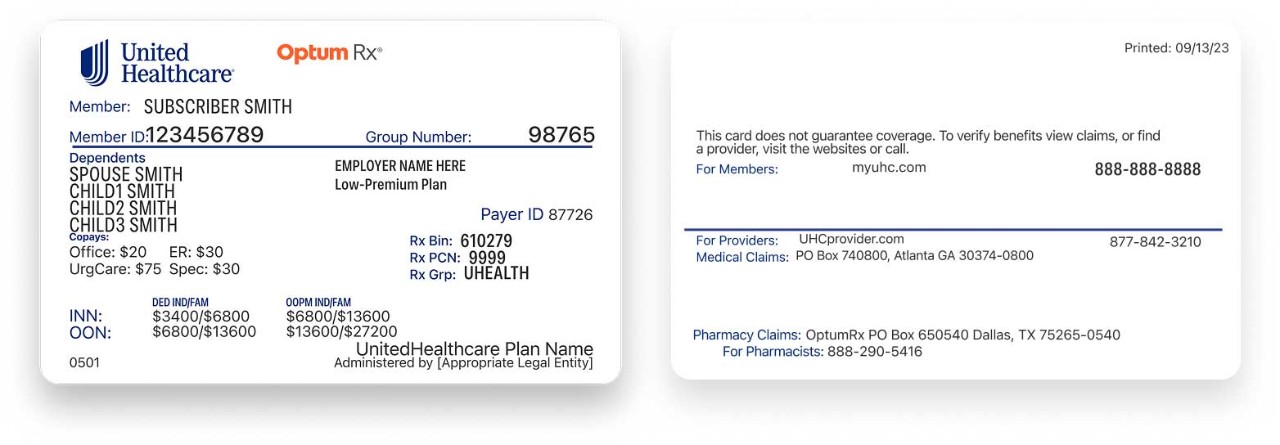
The back of your member ID card may have the member website and phone numbers to connect with customer service, speak with a nurse and discuss behavioral health. It also may include contact information for providers and pharmacists to submit insurance claims.
Frequently asked questions about member ID cards
What’s a member ID number? Each policy holder and their dependents share a unique member ID number.
Where can I find it? In the UHC app and on a physical card, the member ID number is usually on the front of the card.
What’s a group number? This number is specific to your health plan. It helps providers identify your plan for billing. Most health plans have a group number.
Where can I find it? In the UHC app and on a physical card, the group number is usually on the front of the card.
Insurance cards may contain different information based on the insurance company and type of plan. Some providers may use policy number to refer to member ID or group number. It may help to think of your member ID as the number that refers to you, and your group number as the number that refers to your health plan.
Members with a valid email ID or registered Health Safe ID now receive their ID cards digitally. You can access your digital health plan ID card whenever you need it on the UHC app and on your member site. You can show it at your doctor’s office, clinic or anywhere benefits information needs to be shared. Add it to your smartphone’s digital wallet for a secure way to store and access details about your plan.
Note: Vision cards are digital only.
If you choose a paperless delivery preference, a digital ID card replaces your physical ID card. You can access your digital health plan ID card whenever you need it on the UHC app and on your member site. You can show it at your doctor’s office, clinic or anywhere benefits information needs to be shared. Add it to your smartphone’s digital wallet for a secure way to store and access details about your plan.
Note: Vision cards are digital only.
If you lose your physical ID card, you can print, download or view your digital ID card from your member account or the UHC app.
If you lose your physical ID card, you can print, download or view your digital ID card from your member account or the UHC app.
You can request a physical card in the UHC app or your member account. It may take 2 weeks for your new card to arrive in the mail.
Some ID cards show your PCP information. If you change your PCP, it may take 2 weeks for the change to show up on your digital ID card. Wait for the change on your digital ID card before ordering a new physical card.
If you select UnitedHealthcare for a coverage date in the future, your member ID card may show that it is not active yet. It will have your member ID, group number and relevant information, so you can book appointments and schedule care ahead of time for when coverage is active.
When you update your information, a new digital ID card may take some time to process. In the meantime, your card may say, “This is not an official card.” You can use your temporary card to book an appointment with your provider without any delay.
If you need a replacement Medicare card for your UnitedHealthcare plan, you can request a new physical ID card in the UHC app or on your member site. You can also use your digital card.
If you need a replacement Medicare card for your UnitedHealthcare plan, you can request a new physical ID card in the UHC app or on your member site. You can also use your digital card.
If you need a new government-issued Medicare card, visit medicare.gov to learn how to order a replacement.

Already a member?
Use the UHC app or sign in to your member account to chat with customer service, find answers and complete tasks online.
Contact us
Browse options to get support or connect with customer service.